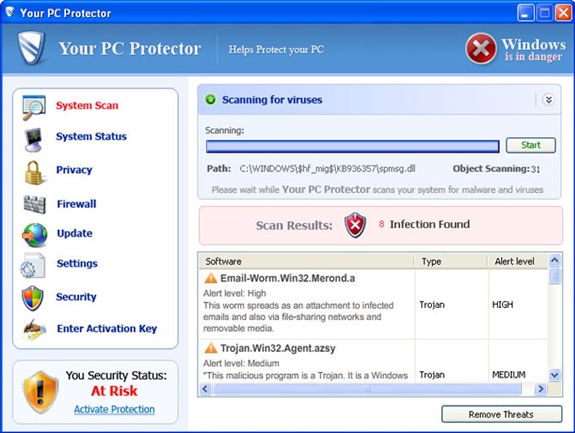
Your PC Protector is a rogue anti-spyware application that belongs to the same family as Windows Police Pro and Windows Antivirus Pro. This program gets installed through Trojans that reach the user through security loopholes and as attachments to spam emails. Once installed, the malware will perform fake scans of the system and generate a number of reports stating that the user’s computer is under threat. It will also hijack the user’s web browser via a Browser Helper Object and generate fake search results that will redirect the user to Your PC Protector’s homepage. The virus then tries to trick the user in to paying for the ‘full’ version of the software, claiming that the currently installed ‘trial’ version is inadequate to remove the detected false ‘threats’. However, no user should allow him to be tricked into paying for this software, as none of its versions can scan or clean any computer system.
Your PC Protector
» Download Your PC Protector Removal Software
In order to remove Your PC Protector, it is necessary to stop its processes, unregister its DLLs, delete files and folders and remove its registry entries.
Your PC Protector File Removal Instructions
The first step you must take to remove this virus is to stop the following processes: ( Learn how to terminate a running process )
- alggui.exe
- svchost.exe
- dbsinit.exe
The next step is to unregister the following DLL file which is related to Your PC Protector:
- adc32.dll
The final step in file removal is to delete the following files and folders:
- %Documents and Settings%\All Users\Desktop\Your PC Protector.lnk
- %Documents and Settings%\All Users\Start Menu\Programs\Your PC Protector
- %ProgramFiles%\adc32.dll
- %ProgramFiles%\alggui.exe
- %ProgramFiles%\nuar.old
- %ProgramFiles%\skynet.dat
- %ProgramFiles%\svchost.exe
- %ProgramFiles%\wp3.dat
- %ProgramFiles%\wp4.dat
- %ProgramFiles%\schtml\dbsinit.exe
- %ProgramFiles%\schtml\wispex.html
- %ProgramFiles%\schtml\images\i1.gif
- %ProgramFiles%\schtml\images\i2.gif
- %ProgramFiles%\schtml\images\i3.gif
- %ProgramFiles%\schtml\images\j1.gif
- %ProgramFiles%\schtml\images\j2.gif
- %ProgramFiles%\schtml\images\j3.gif
- %ProgramFiles%\schtml\images\jj1.gif
- %ProgramFiles%\schtml\images\jj2.gif
- %ProgramFiles%\schtml\images\jj3.gif
- %ProgramFiles%\schtml\images\l1.gif
- %ProgramFiles%\schtml\images\l2.gif
- %ProgramFiles%\schtml\images\l3.gif
- %ProgramFiles%\schtml\images\pix.gif
- %ProgramFiles%\schtml\images\t1.gif
- %ProgramFiles%\schtml\images\t2.gif
- %ProgramFiles%\schtml\images\up1.gif
- %ProgramFiles%\schtml\images\up2.gif
- %ProgramFiles%\schtml\images\\w1.gif
- %ProgramFiles%\schtml\images\w11.gif
- %ProgramFiles%\schtml\images\w2.gif
- %ProgramFiles%\schtml\images\w3.gif
- %ProgramFiles%\schtml\images\w3.jpg
- %ProgramFiles%\schtml\images\word.doc
- %ProgramFiles%\schtml\images\wt1.gif
- %ProgramFiles%\schtml\images\wt2.gif
- %ProgramFiles%\schtml\images\wt3.gif
- %ProgramFiles%\Your PC Protector\Your PC Protector.exe
- %Programs%\Your PC Protector.lnk
- %Desktop%\Your PC Protector.lnk
Once these files and folders have been deleted, Your PC Protector no longer resides on your hard disk. In order to make sure of this fact a full system scan using genuine antivirus software such as Spyware Doctor with Antivirus should be considered immediately after this step.
Your PC Protector Registry Removal Instructions
Deleting files alone is not sufficient to completely remove Your PC Protector from your system. The following registry keys and settings should also be removed: (How to Edit Registry Here)
- HKEY_CURRENT_USER\Software\Your PC Protector
- HKEY_LOCAL_MACHINE\SOFTWARE\Microsoft\Windows\CurrentVersion\Uninstall\Your PC Protector
- HKEY_LOCAL_MACHINE\SOFTWARE\Microsoft\Windows\CurrentVersion\Run “Your PC Protector”
- HKEY_CURRENT_USER\Software\Microsoft\Windows NT\CurrentVersion\TaskManager
- HKEY_CURRENT_USER\Software\Your PC Protector
- HKEY_CLASSES_ROOT\CLSID\{77DC0Baa-3235-4ba9-8BE8-aa9EB678FA02}
- HKEY_LOCAL_MACHINE\SOFTWARE\Microsoft\Windows\CurrentVersion\Explorer\Browser Helper Objects\{77DC0Baa-3235-4ba9-8BE8-aa9EB678FA02}
- HKEY_LOCAL_MACHINE\SYSTEM\ControlSet001\Enum\Root\LEGACY_ADBUPD
- HKEY_LOCAL_MACHINE\SYSTEM\ControlSet001\Services\AdbUpd
- HKEY_LOCAL_MACHINE\SYSTEM\CurrentControlSet\Enum\Root\LEGACY_ADBUPD
- HKEY_LOCAL_MACHINE\SYSTEM\CurrentControlSet\Services\AdbUpd
After you have completed this step, your computer should be safe from Your PC Protector. You should still run a full security scan using whatever your favorite security software is.
Outside Resources:
http://www.bleepingcomputer.com/virus-removal/remove-your-pc-protector
Speak Your Mind