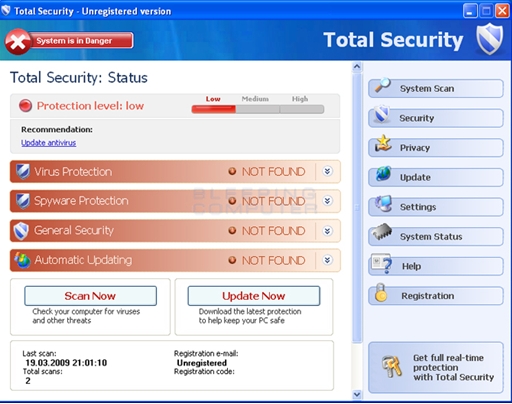
Description: Total XP Security also known as “TotalXPSecurity”, is a dangerous rogue anti-spyware that uses scare tactics to try and trick users into buying a software license. It usually gets installed via Trojans that get downloaded from fake online scanners, other dangerous websites and even through the use of social engineering methods and even through social networking websites. Once installed Total XP Security loads at boot time and performs a large number of fake scans on the system, returning false results that show that a large number of malware applications are present. To stop the user from attempting to remove this malicious program, it blocks essential Windows services such as Task Manager and Registry Editor. Total XP Security also generates fake pop-ups from the Windows taskbar saying that the computer is under threat. Finally, Total XP Security insists that the user purchase a license to the ‘full’ version software, claiming that the currently installed ‘trial’ version is insufficient to remove the detected ‘threats’. However, you should never allow yourself to be tricked into paying for the so-called ‘full’ version, as it is just as incapable of scanning or cleaning your computer as the ‘trial’ version is.
Total XP Security
» Download Total XP Security Removal Software
In order to delete Total XP security, it is necessary to stop its processes, delete its files and folders and remove its registry entries.
Total XP Security Manual Removal Procedures
The first step you need to take in order to remove Total XP Security is to stop the following process:
- ave.exe
The next step in Total XP Security removal is to delete the following file:
- %UserProfile%Local SettingsApplication Dataave.exe
Total XP Security Registry Removal Proedures
Removing files alone is not sufficient to completely delete Total XP Security. The following registry keys and settings should be deleted as well:
- HKEY_CURRENT_USERSoftwareClasses.exe
- HKEY_CURRENT_USERSoftwareClasses.exeDefaultIcon
- HKEY_CURRENT_USERSoftwareClasses.exeshell
- HKEY_CURRENT_USERSoftwareClasses.exeshellopen
- HKEY_CURRENT_USERSoftwareClasses.exeshellopencommand
- HKEY_CURRENT_USERSoftwareClasses.exeshellrunas
- HKEY_CURRENT_USERSoftwareClasses.exeshellrunascommand
- HKEY_CURRENT_USERSoftwareClasses.exeshellstart
- HKEY_CURRENT_USERSoftwareClasses.exeshellstartcommand
- HKEY_CURRENT_USERSoftwareClassessecfile
- HKEY_CURRENT_USERSoftwareClassessecfileDefaultIcon
- HKEY_CURRENT_USERSoftwareClassessecfileshell
- HKEY_CURRENT_USERSoftwareClassessecfileshellopen
- HKEY_CURRENT_USERSoftwareClassessecfileshellopencommand
- HKEY_CURRENT_USERSoftwareClassessecfileshellrunas
- HKEY_CURRENT_USERSoftwareClassessecfileshellrunascommand
- HKEY_CURRENT_USERSoftwareClassessecfileshellstart
- HKEY_CURRENT_USERSoftwareClassessecfileshellstartcommand
- HKEY_CURRENT_USERSoftwareClasses.exeshellopencommand | @ =“”%AppData%ave.exe” /START “%1″ %*”
- HKEY_CURRENT_USERSoftwareClasses.exeshellopencommand |
IsolatedCommand = “”%1″ %*”
- HKEY_CURRENT_USERSoftwareClasses.exe | @ = “secfile”
- HKEY_CURRENT_USERSoftwareClasses.exe | Content Type = “application/x-msdownload”
- HKEY_CURRENT_USERSoftwareClassessecfileshellopencommand | @ = “”%AppData%ave.exe” /START “%1″ %*”
HKEY_CURRENT_USERSoftwareClassessecfileshellopencommand | IsolatedCommand = “”%1″ %*”
Once the registry has been cleaned, you should still run a full security scan on your computer to ensure no other trojans or viruses are present.
Total XP Security Directories:
- NONE
Outside Resources:
http://www.bleepingcomputer.com/virus-removal/remove-xp-total-security-2013
http://answers.yahoo.com/question/index?qid=20110409075305AAxhLMp
Speak Your Mind